AI can create a picture, but creating a finished piece of production artwork is a different process. An image that looks great on a computer screen is not necessarily ready to be printed on a shirt.
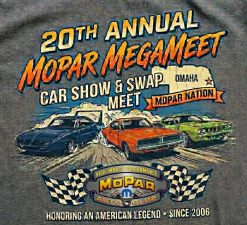 Here’s an example of an image created by a client using AI that they then wanted to have screen printed. This image has several major problems and will need a designer to rework it before it can be printed.
It appears that the client prompted the AI to create an image for a T-shirt, and the AI responded by actually creating the T-shirt behind the design. The shirt color the AI generated wasn’t even the color the design was going on. This affects the appearance of the design’s colors, and the fake shirt will need to be removed from the rest of the image.
 In addition, the AI created transparent colors on top of the fake shirt. This creates additional work for the designer to separate the actual artwork from the generated shirt.
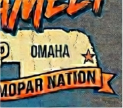
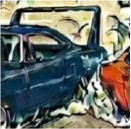 In this detail, you can see that the image is jagged and has no clear definition. This is because the AI wasn’t instructed to create a high-resolution image and instead generated the image at a small size. If you cannot clearly see the details of the image, the designer will have the same problem when trying to work with it.
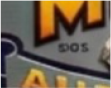 AI also has the unfortunate habit of interpreting elements incorrectly. The text under the “M” in the shield was supposed to be “Est.”, but the AI generated gibberish in its place. The client didn’t notice it, and the designer has no way of knowing what it was actually supposed to say.
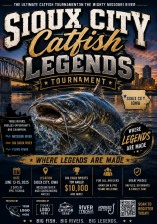 This second example of customer-supplied AI art shares many of the same issues as the first example, including the overuse of colors.
There are hundreds of colors in this image used to create a realistic fish. Images on a monitor can use virtually any number of colors, but when it comes to traditional screen printing, there is a limit to the total number of ink colors that can be used to create a design.
A computer monitor can display millions of different colors because it creates an image using light. A screen print is different. Each ink color generally requires its own screen and separation, so an image containing hundreds of colors cannot simply be sent to the press and reproduced exactly as it appears on a monitor.
 Where the first image lacked detail, this example suffers from having too much. Screen printing can only reproduce details to a certain degree. Small details can be lost during the printing process.
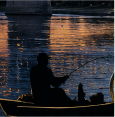 Another issue with AI is that it tends to clip the edges of artwork. The client wanted the edges to fade out to the shirt, so the designer will need to create matching elements to produce that effect, which will take additional time.
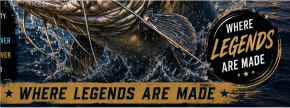 In this detail, you can see where the AI used the same tagline, “Where Legends Are Made,” twice. This is because AI does not truly understand language or design, so it will often fill in requested text multiple times or even change it to fit a space. Removing the circle version will require additional design work to correct the artwork.
Because it wasn’t instructed on what to use, the AI used black for the background of the design, but the client wants the design on a bright-colored shirt. Since black is used throughout the design, reconstructing the artwork will take additional time and may require another ink color to make the design work correctly.
So, are there ways to use AI to create art that can then be screen printed?
A great designer can take a poorly made AI image and work with you to create a design that meets both your expectations and production needs. There are also steps that you can take to create better and more usable AI images to start with.
How to effectively use AI to create art for screen printing
What you enter for the prompt is one of the most important steps. Extra time spent making a clear request can have a massive impact on the artwork that the AI creates. The following prompt details will help create AI art that is more suitable for screen printing.
Start by informing the AI that the art will be used for a screen-printed design. Many AI programs have a basic understanding of the screen-printing process and will attempt to work within those parameters. Example, “Create a design for screen printing.”
Use specific details about what you want created. Example, “This is for a State Swimming and Diving contest. The design should have some male and female swimmers and divers. The background should have water splashes.”
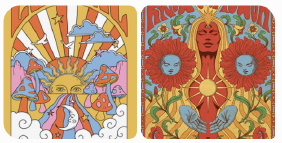
If you have a design style in mind, you can upload a reference image for the AI to base its design on. If you want a ’70s, hippie-looking design, upload a couple of examples so that the AI understands the style you want it to create. Example, “Please reference the uploaded images for the style of the overall design.”
List the exact number of colors you want it to use in the design. Because AI tends to add colors, do not request more than five colors. The more ink colors used, the more expensive a design can be to print. Example, “Use only Black, Royal Blue, Sky Blue and Light Grey in the design.”
Indicate if the background will be a light or dark color. Tell the AI to use either white or black for the background color. Example, “Use a White background.”
Specify that you do not want it to use transparent colors on the outside elements. Example, “Do not fade the edges of the design. Make the outside elements solid and not transparent.”
Type the exact text that you want to use, place it within quotation marks, and tell the AI specifically how it should be located within the design. Direct it to use only the text and spelling provided and not to include any additional text. Example, “Place “STATE SWIM & DIVE” at the top of the design. Place “2027” at the bottom. Use a funky font. Do not add any other text.”
Review the AI art to ensure that it is what you want and that it is correct. Do not assume that the AI got everything right. Carefully check the spelling, text, anatomy, number of people or objects, details, colors and overall layout. Try to provide the final version of what you would like recreated. Have the AI make any corrections or edits using concise and specific instructions.
When you have an image that matches what you want, instruct the AI that you will need a high-resolution version of the final image. The better the resolution, the easier it will be for a designer to work with. If possible, have it create an SVG file of the art. SVG stands for Scalable Vector Graphics, which is a format that can be scaled without losing quality and can be easier for designers to work with. Example, “Please create a high-resolution version of the image and provide a vector SVG file.”
Even after following all of these steps, the resulting artwork should still be considered a starting point rather than guaranteed production-ready artwork. AI can get surprisingly close, but it can still make mistakes that are difficult to see until the image is examined closely or prepared for printing.
Using the guide above, let’s have AI create a design for Swim & Dive shirt.
Here is the prompt:
Create a design for screen printing. This is for a State Swimming and Diving contest. The design should have some male and female swimmers & divers. The background should have water splashes. Please reference the uploaded images for the style of the overall design. Use only Black, Royal Blue, Sky Blue and Light Grey in the design. Use a White background. Do not fade the edges of the design. Make the outside elements solid and not transparent. Place “STATE SWIM & DIVE” at the top of the design. Place “2027” at the bottom. Use a funky font. Do not add any other text.
These are the reference images the AI was provided:
This is the result:
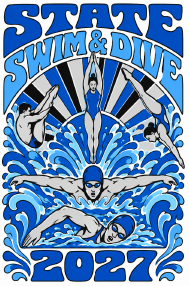
This is a pretty good start, but it contains errors. The lines around the text are not complete, and the legs and feet of the divers are wrong. This art will need further correction.
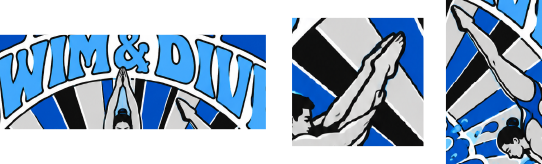
The image it created was uploaded and a prompt for corrections was entered:
Fix the legs and feet of the left and right divers. Please create a high-resolution version and provide a vector SVG file.
Here is the revision:
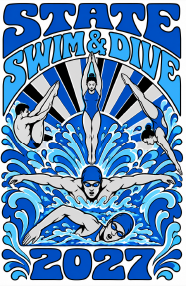
This higher-resolution version fixed the issues with the text. The AI was able to fix the legs and feet of the diver on the left but failed to fix them on the diver on the right. Her knee and calf are still backwards:
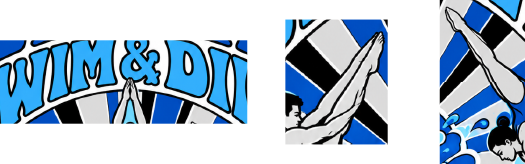
However, this art is nearly ready to be used, and a designer can easily fix the leg and the other small elements that are incorrect. The AI failed to create a suitable .SVG file, but it did create a nice, high-resolution .PNG file that is usable.
How to best recreate AI art
The example above can easily be turned into a screen-print design. But what about the first two examples?
Use Transfers
Transfers are a great solution for replicating AI art. They allow for virtually unlimited colors, can reproduce images very closely, and can be used on almost any shirt color. If preserving the appearance of the original AI image is more important than using traditional spot-color screen printing, transfers can be a good option.
If you do not want to use transfers, there are some other options to reproduce AI art.
Use Spot Color over Index Separations
Selecting specific stock ink colors can produce better results than creating a print by using a mixture of colors. Spot colors tend to have cleaner lines, are easier to reproduce consistently, and look sharper.
Do not expect an exact match
Even if you follow the above suggestions, it is impossible to recreate an exact one-to-one match. Taking an image that was created electronically and turning it into something that is physically printed requires some compromise.
A computer screen and a printed shirt create color and detail in very different ways. The shirt color can affect how the inks appear, the number of inks may need to be limited, and very small details may need to be changed or removed so that they can reproduce properly.
The artists will do their best, using all the tools at their disposal, including AI, to create designs that match your vision.
Colors can also shift in hue when seen against different shirt colors. Limits on the maximum number of inks that can be printed can also require changes to the artwork.
From Impossible to Practical
Returning to the artwork shown at the beginning, can it be screen printed?
Great designers can use several different tools, including AI, to take less-than-ideal AI art and create designs that can be produced successfully as screen prints while still meeting the client’s expectations.
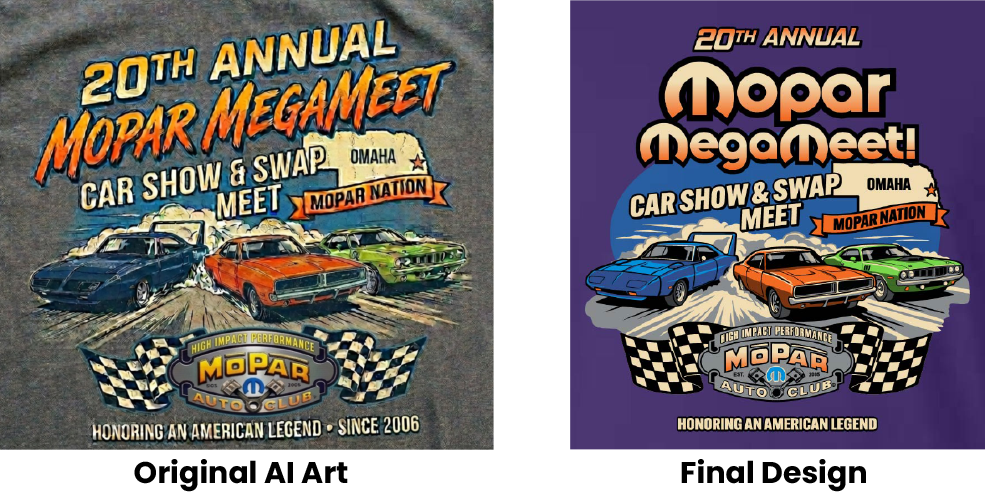
In the first example, the designer used AI to clean up the image. The majority of the design had to be completely redone. Working with the client, many of the provided details were completely changed, from the fonts used and the top layout to many other smaller details. By using spot colors, the final artwork is crisp and the details are clear.
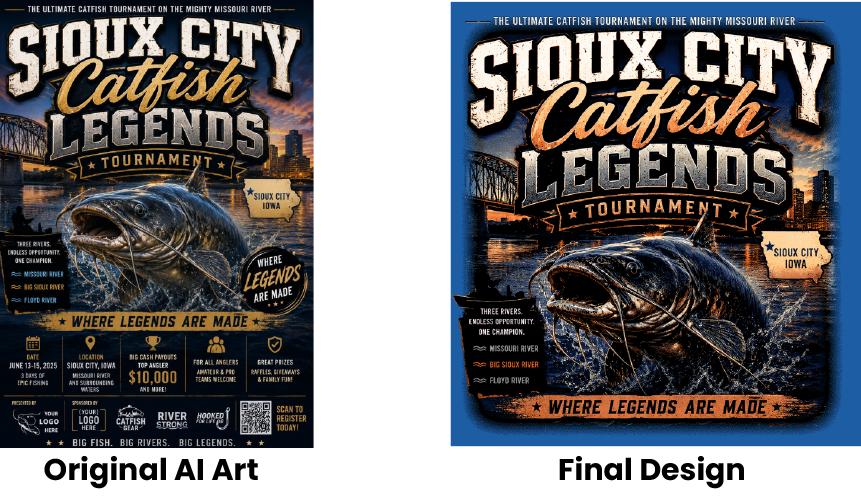
In the second example, an index-separation screen print was needed because of the high number of colors required to produce a realistic-looking fish and skyline. In addition, the client requested that much of the information provided in the AI-generated image be removed.
The designer had to use many different art programs and AI tools to adjust the starting image and create the outside border and lower portion of the fish coming out of the water. The designer selected colors that would work best for the screen-printing process and created a final design that met the client’s expectations.
Will AI Replace Designers?
The simple answer is a very firm no.
If anything, AI has only proven how important great designers are in the process of creating art for screen printing. Unfortunately, the ability to generate AI images has given some people the false impression that anyone can create a design that can then be screen printed.
AI can create the picture. A designer has to turn that picture into something that can actually be printed.
The years of experience and education, along with knowledge of the screen-printing process and how to correctly use AI tools, give designers unique insight into how to take AI art and convert it into artwork that can actually be produced as a screen-printed design.
A designer understands not only what looks good on a screen, but also what will work with ink, screens, shirt colors, separations, registration, detail and the limitations of the printing process. That knowledge is what allows a designer to take an AI-generated image and turn it into a practical finished product.
As AI continues to improve and change how artwork is generated, great designers will continue to play an important role in this process.

Recent Comments